


The Benazir Income Support Programme (BISP) is Pakistan’s largest social protection initiative, providing financial assistance to millions of deserving and low-income families across the country. In 2026, the programme continues to expand its reach, and the 8171 payment verification system remains the most important tool for beneficiaries to confirm their payment status.
Whether you are a new applicant or an existing beneficiary, knowing how to verify your BISP 8171 payment is essential. This comprehensive, step-by-step guide explains every method available in 2026 — SMS, online portal, helpline, and in-person verification — so you never miss your due payment.
What Is BISP 8171?
8171 is the official SMS helpline number of the Benazir Income Support Programme. The Government of Pakistan introduced this short code to allow beneficiaries to check their eligibility, payment status, and registration details quickly and free of cost using any mobile phone — even a basic keypad phone.
Through the 8171 portal and SMS service, beneficiaries can:
- Verify payment status for the current quarter
- Check CNIC registration status
- Confirm the amount credited to their account
- Locate the nearest payment centre
- Track complaint status
Why BISP Payment Verification Matters in 2026
In 2026, BISP has updated its payment schedules, increased quarterly stipends, and introduced dynamic surveys for re-verification of beneficiaries. Many families have been added, removed, or placed under review. Without verifying your status, you may:
- Miss a scheduled payment without knowing it
- Fail to update outdated CNIC or contact information
- Be excluded due to incomplete survey data
- Fall victim to BISP payment scams targeting unverified beneficiaries
Regular verification protects your entitlement and keeps your record accurate.
BISP 8171 Payment Verification Methods 2026
There are four main methods to verify your BISP 8171 payment in 2026:
- SMS via 8171
- Online via the BISP Web Portal
- BISP Helpline Call
- In-Person at a BISP Tehsil Office or Payment Point
Each method is explained in detail below.
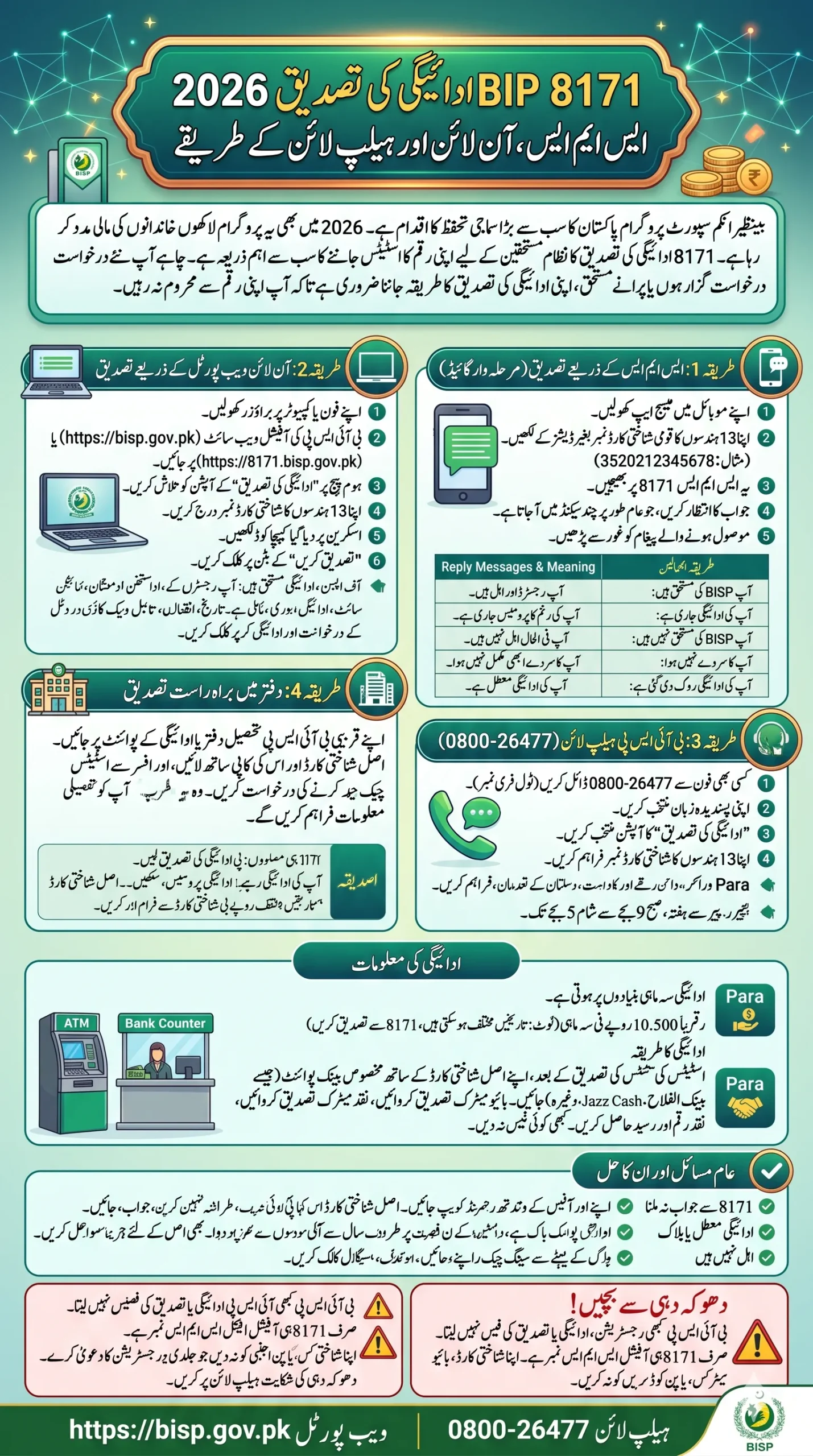
Method 1: BISP 8171 SMS Payment Verification (Step-by-Step)
This is the fastest and most widely used method, requiring only a mobile phone and your CNIC number.
Steps to Verify Payment via SMS
Step 1: Open the SMS/messaging application on your mobile phone.
Step 2: Type your 13-digit CNIC number without dashes.
Example: 3520212345678
Step 3: Send this SMS to 8171.
Step 4: Wait for the reply message — it typically arrives within a few seconds to 2 minutes.
Step 5: Read the reply carefully. The message will contain one of the following:
| Reply Message | Meaning |
| “آپ BISP کی مستحق ہیں” | You are eligible and registered |
| “آپ کی ادائیگی جاری ہے” | Your payment is being processed |
| “آپ BISP کی مستحق نہیں ہیں” | You are not currently eligible |
| “آپ کا سروے نہیں ہوا” | Your survey has not been conducted |
| “آپ کی ادائیگی روک دی گئی ہے” | Your payment has been suspended |
Important Notes for SMS Verification
- The service works on all networks: Jazz, Telenor, Ufone, Zong, and SCOM.
- There is no SMS charge — the service is free.
- Use the registered CNIC of the female head of household.
- Do not add spaces or dashes in the CNIC number.
- If you receive no reply, wait 10 minutes and try again.
Method 2: BISP Online Payment Verification via Web Portal (Step-by-Step)
For beneficiaries with internet access, the BISP official website provides a detailed payment verification dashboard.
Steps to Verify Payment Online
Step 1: Open a web browser on your smartphone or computer.
Step 2: Visit the official BISP web portal:
https://bisp.gov.pk or https://8171.bisp.gov.pk
Step 3: Look for the option labelled “Check Payment Status” or “ادائیگی کی تصدیق” on the homepage.
Step 4: Enter your 13-digit CNIC number in the provided field (without dashes).
Step 5: Enter the CAPTCHA verification code shown on the screen.
Step 6: Click the “Submit” or “تصدیق کریں” button.
Step 7: Your payment status will appear on the screen, showing:
- Registration status
- Quarterly payment amount (e.g., PKR 10,500 or current rate)
- Payment date
- Payment collection point or bank name
- Any pending or suspended payments
Tips for Online Verification
- Always use the official BISP website. Beware of fake websites that collect CNIC data.
- The portal is available 24 hours a day, 7 days a week.
- If the website is temporarily down, try again after 30 minutes or use the SMS method.
- Bookmark the official URL to avoid phishing sites.
Method 3: BISP Helpline Verification (Step-by-Step)
If you are unable to use SMS or the internet, you can call the BISP helpline to speak with an agent.
Steps to Verify via Helpline
Step 1: Dial 0800-26477 from any mobile or landline phone.
This is a toll-free number — no call charges apply.
Step 2: Select your preferred language (Urdu or English) from the IVR menu.
Step 3: Choose the option for “Payment Verification” or “ادائیگی کی تصدیق”.
Step 4: Provide your 13-digit CNIC number when prompted by the system or agent.
Step 5: The agent will confirm your payment status, amount, and collection point.
Helpline Availability
- Operating Hours: Monday to Saturday, 9:00 AM – 5:00 PM (Pakistan Standard Time)
- Language Support: Urdu, English, and regional languages
- For complaints or appeals, ask to speak with a BISP complaint officer
Method 4: In-Person Verification at BISP Office or Payment Point (Step-by-Step)
For beneficiaries who prefer face-to-face assistance or are dealing with complex issues (blocked payments, wrong CNIC, etc.), visiting a BISP office is the most reliable option.
Steps for In-Person Verification
Step 1: Locate your nearest BISP Tehsil Office or BISP Payment Point (HBL, Bank Alfalah, Jazz Cash, EasyPaisa, or Pakistan Post).
Step 2: Bring the following documents:
- Original CNIC (Computerised National Identity Card)
- Copy of your CNIC
- Any previous BISP payment slip (if available)
Step 3: Approach the BISP counter or officer on duty and request payment status verification.
Step 4: The officer will search your CNIC in the BISP database and provide you with:
- Current eligibility status
- Payment details for the current and previous quarters
- Reason for any suspension or hold (if applicable)
Step 5: If your payment is delayed or blocked, the officer will guide you on how to file a complaint or correction request.
BISP Payment Schedule 2026 – What to Expect
In 2026, BISP distributes payments on a quarterly basis. The approximate schedule is:
| Quarter | Period | Expected Payment Month |
| 1st Quarter | January – March | February / March 2026 |
| 2nd Quarter | April – June | May / June 2026 |
| 3rd Quarter | July – September | August / September 2026 |
| 4th Quarter | October – December | November / December 2026 |
Note: Payment dates may vary by district. Always verify your specific payment date via 8171 SMS or the official portal.
Current BISP Payment Amount (2026)
The quarterly payment amount for eligible BISP beneficiaries in 2026 is approximately PKR 10,500 per quarter (subject to change by government notification). This amount is paid in one installment per quarter and can be collected at designated payment points.
How to Collect BISP Payment After Verification
Once you have confirmed your payment status, follow these steps to collect your money:
Step 1: Note the payment collection point mentioned in your SMS or portal reply (e.g., HBL Bank, Bank Alfalah, Jazz Cash Agent, Pakistan Post, or EasyPaisa).
Step 2: Visit the payment point during business hours with your original CNIC.
Step 3: For biometric verification, place your thumb on the device as instructed.
Step 4: Once your identity is confirmed, the cash will be disbursed to you directly.
Step 5: Collect your payment receipt as proof of transaction.
Important: Never give your CNIC or biometric information to any unofficial agent or middleman. BISP payments are free — you should never pay anyone a “fee” to collect your money.
Common Problems with BISP 8171 Verification and Their Solutions
Problem 1: No Reply from 8171 SMS
Solution: Check your network signal. Try again after 15 minutes. If no reply after multiple attempts, call the helpline at 0800-26477.
Problem 2: “Not Eligible” Message Despite Being Poor
Solution: Your Proxy Means Test (PMT) score may be above the eligibility threshold. Visit your nearest BISP Tehsil Office and request a re-survey with updated household information.
Problem 3: Payment Suspended or Blocked
Solution: Your payment may be suspended due to CNIC expiry, duplicate registration, or failed biometric verification. Visit a BISP office immediately with your original CNIC and supporting documents.
Problem 4: Wrong Payment Amount Received
Solution: Report the discrepancy immediately at the payment counter or call the helpline. Keep your payment receipt as evidence.
Problem 5: CNIC Not Registered in BISP Database
Solution: You may need to complete a NSER Dynamic Survey. Ask BISP staff when the next survey will be conducted in your area.
How to Register for BISP in 2026 (For New Applicants)
If you are not yet registered and believe you qualify, follow these steps:
- Wait for a BISP Survey team to visit your area (announced locally) OR visit your nearest BISP Tehsil Office.
- Provide your CNIC, household income details, assets, and family information honestly.
- The surveyor will calculate your PMT (Poverty Means Test) score.
- If your score falls below the eligibility cutoff, you will be registered automatically.
- Verify your registration status within 4–6 weeks using the 8171 SMS method.
Beware of BISP Scams in 2026
Fraudsters frequently target BISP beneficiaries. Protect yourself by remembering:
- BISP never charges any fee for registration, payment, or verification.
- 8171 is the only official SMS number — do not trust other numbers.
- BISP staff will never ask for your PIN, bank account password, or mobile wallet password.
- Do not share your CNIC with strangers claiming to offer “faster registration.”
- Report scams to the BISP helpline at 0800-26477 or the FIA Cybercrime Wing at 9911.
Frequently Asked Questions (FAQs)
Q1. What is the BISP 8171 helpline?
8171 is the official SMS number of the Benazir Income Support Programme used to check payment eligibility and status free of charge from any mobile network in Pakistan.
Q2. How do I check my BISP payment status in 2026?
Send your 13-digit CNIC number (without dashes) as an SMS to 8171. You will receive a reply confirming your payment status within minutes.
Q3. Is the 8171 SMS service free?
Yes. Sending an SMS to 8171 is completely free on all Pakistani mobile networks including Jazz, Telenor, Ufone, and Zong.
Q4. What is the BISP payment amount in 2026?
As of 2026, eligible beneficiaries receive approximately PKR 10,500 per quarter. The amount is announced by the government and may be revised.
Q5. What should I do if my BISP payment is blocked?
Visit your nearest BISP Tehsil Office with your original CNIC. The officer will identify the reason for the block and guide you on how to resolve it.
Q6. Can I check BISP status without a smartphone?
Yes. The 8171 SMS service works on all mobile phones including basic keypad phones. No internet connection is required.
Q7. How many times can I send an SMS to 8171?
There is no official limit. However, sending too many messages in a short period may temporarily delay responses.
Q8. What is the BISP toll-free helpline number?
The BISP toll-free helpline is 0800-26477, available Monday to Saturday, 9 AM to 5 PM.
Conclusion
The BISP 8171 payment verification process in 2026 is straightforward, free, and accessible to everyone — whether you use SMS, the online portal, the helpline, or visit in person. Regularly checking your payment status ensures you receive every rupee you are entitled to and helps you quickly address any issues before they delay your payments.
If you found this guide helpful, share it with your family and neighbors who may also be BISP beneficiaries. Knowing your rights and using the official verification channels is the best protection against fraud and missed payments.